Screenshots

App details
- Version
- 1.0
- Size
- 1.29 MB
- Updated
- October 16, 2013
- Requires
- Windows 8
- Language
- English
- License
- Free
- Developer
- rartozipconverter
- Category
- Windows OS
SoftPas in:
This product is also available in the following languages:
About RAR to ZIP Converter
Download RAR to ZIP Converter – Free, Secure & Easy File Conversion Tool for Windows, Mac, Android, iOS
Looking for a reliable way to convert RAR files to ZIP without needing WinRAR? The RAR to ZIP Converter is your ideal solution. This lightweight, free software allows users to effortlessly transform RAR archives into the widely compatible ZIP format. Whether you're dealing with downloaded content, work files, or media, this tool ensures seamless access across devices and platforms. With a simple interface and no installation hassles, it's perfect for beginners and professionals alike. The converter supports password-protected RAR files, allows custom compression levels, and outputs secure ZIP archives. It’s compatible with Windows, Mac, Android, and iOS, making it one of the most versatile file conversion tools available today. No more compatibility issues—just fast, secure, and hassle-free conversion.
Key Features of RAR to ZIP Converter
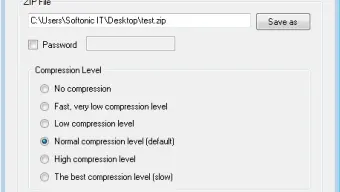
The RAR to ZIP Converter stands out in the crowded file management space due to its powerful yet intuitive feature set. One of the most valuable features is its ability to convert RAR files to ZIP without requiring any prior knowledge of archive formats. The process is fully automated: users simply select the RAR file, choose the desired compression level (from low to high), and optionally set a password for the new ZIP file. This level of customization ensures that your output file is optimized for size and security.
Another standout feature is support for password-protected RAR archives. Many users encounter encrypted RAR files that they can't open without the correct password. This converter allows you to enter the password during the conversion process, ensuring secure access to your data. Once converted, the ZIP file inherits the same protection, so your files remain private and safe. Additionally, the tool maintains file integrity during conversion—no data loss, no corruption, just clean, usable archives.
For those who frequently work with large files or multiple archives, the batch conversion function is a game-changer. Instead of converting files one by one, you can select multiple RAR files and convert them all at once, saving valuable time. The tool also offers a clean, distraction-free interface with drag-and-drop functionality, making it accessible even to non-technical users. Real-time progress tracking keeps you informed throughout the process, and the output folder is automatically opened upon completion. Whether you're a student, freelancer, or IT professional, these features make RAR to ZIP Converter a must-have tool in your digital toolkit.
How to Use RAR to ZIP Converter – Step-by-Step Guide
Using the RAR to ZIP Converter is designed to be as simple as possible, even for users with minimal technical experience. The first step is to download and install the software from the official website. The installation process is quick—just a few clicks—and doesn’t require administrator privileges on most systems. Once installed, launch the app to access the main interface.
Next, click the “Add File” button or use the drag-and-drop feature to select your RAR file. If the file is password-protected, a prompt will appear asking for the password. Enter it correctly to proceed. After loading the file, you’ll see options to adjust the compression level. Choose between Fast (low compression), Normal (balanced), or Maximum (high compression), depending on your needs. For example, if you're sending files via email, a lower compression setting may be ideal to reduce processing time.
Optionally, you can set a password for the new ZIP file by checking the “Set Password” box and entering your desired credentials. This adds an extra layer of security, especially when dealing with sensitive data. Finally, click the “Convert” button. The tool will begin processing the file—usually within seconds, even for large archives. Once complete, a notification will appear, and the converted ZIP file will be saved to your chosen location. You can then open it with any standard ZIP-compatible software, including built-in tools on Windows, Mac, or mobile devices.
Compatibility & System Requirements
The RAR to ZIP Converter is built for maximum compatibility, ensuring you can use it regardless of your device or operating system. It supports Windows 7 and later, including Windows 10 and Windows 11, making it suitable for both home and office environments. For Mac users, the software runs smoothly on macOS 10.14 (Mojave) and above, including the latest Apple Silicon (M1/M2) chips, thanks to native optimization.
Mobile users aren’t left behind either. The app is available as a free download for Android and iOS, allowing you to convert RAR files directly from your smartphone or tablet. This is especially useful when you’re on the go and need to access files from a cloud storage service or email attachment. The mobile version maintains the same core functionality—password support, compression control, and secure output—ensuring a consistent experience across platforms.
System requirements are minimal. On desktop, you’ll need at least 512 MB of RAM and 50 MB of free disk space. The app is lightweight and doesn’t consume excessive CPU or memory during conversion. It’s also compatible with both 32-bit and 64-bit systems. For users concerned about security, the software is virus-free and does not include adware or spyware. All data remains on your device—no uploads to external servers—ensuring privacy and compliance with data protection standards.
Pros & Cons: Is RAR to ZIP Converter Right for You?
- Pros:
- Free to download and use with no hidden fees
- Supports password-protected RAR files
- Batch conversion for multiple files
- Lightweight and fast performance
- Available for Windows, Mac, Android, and iOS
- Preserves file integrity and metadata
- No installation required for portable use
- Cons:
- Limited to RAR-to-ZIP conversion only
- No built-in extraction feature for ZIP files
- Advanced users may miss more granular settings
- Mobile version lacks some desktop features
- Customer support is limited to FAQs and email
Frequently Asked Questions (FAQ)
Final Verdict: Why You Should Download RAR to ZIP Converter Today
If you’ve ever been stuck with a RAR file that you can’t open due to missing software, the RAR to ZIP Converter is your ultimate rescue tool. It’s fast, secure, and completely free—offering a seamless bridge between incompatible archive formats. Whether you're a student downloading course materials, a remote worker sharing files, or a casual user managing personal documents, this software removes the frustration of format incompatibility.
With support for multiple platforms, batch processing, password protection, and zero data sharing, it’s one of the most trustworthy file conversion tools available. The clean interface and straightforward workflow make it ideal for users of all skill levels. While it doesn’t offer extraction for ZIP files or advanced compression settings, its core purpose is executed flawlessly.
Don’t let outdated or unsupported archive formats slow you down. Download RAR to ZIP Converter today and enjoy instant access to your files—no extra software required. It’s the smart, secure, and free choice for anyone who needs to convert RAR to ZIP with confidence.
Guides & Tutorials
How to install RAR to ZIP Converter
- Click the Download button above.
- Once redirected, accept the terms and click Install.
- Wait for the RAR to ZIP Converter download to finish on your device.
How to use RAR to ZIP Converter
This software is primarily used for its core features described above. Open the app after installation to explore its capabilities.
User Reviews
No reviews yet. Be the first to share your experience.
You may also like
more
Llama 2
Free-to-use large language model As the new addition to Meta’s arsenal of langua...

NotebookLM
Revolutionizing the note-taking and idea-generation process NotebookLM is an exp...

Github co pilot
AI-inspired software development and coding platform GitHub Copilot is a browser...

Google Gemma
Google’s lightweight AI models Introducing Google Gemma , a family of cutting-ed...

AI Image Enlarger
A free app for Windows, by ai-image-larger. AI Image Enlarger is a free software...

DALL E
AI-driven text-to-image transformation engine DALL·E is a free graphic and desig...